AI Article Assistant
Ask questions, summarize, or extract key takeaways from this article.
Proforma Invoice Format India — Create Free Proforma Invoices in 60 Seconds
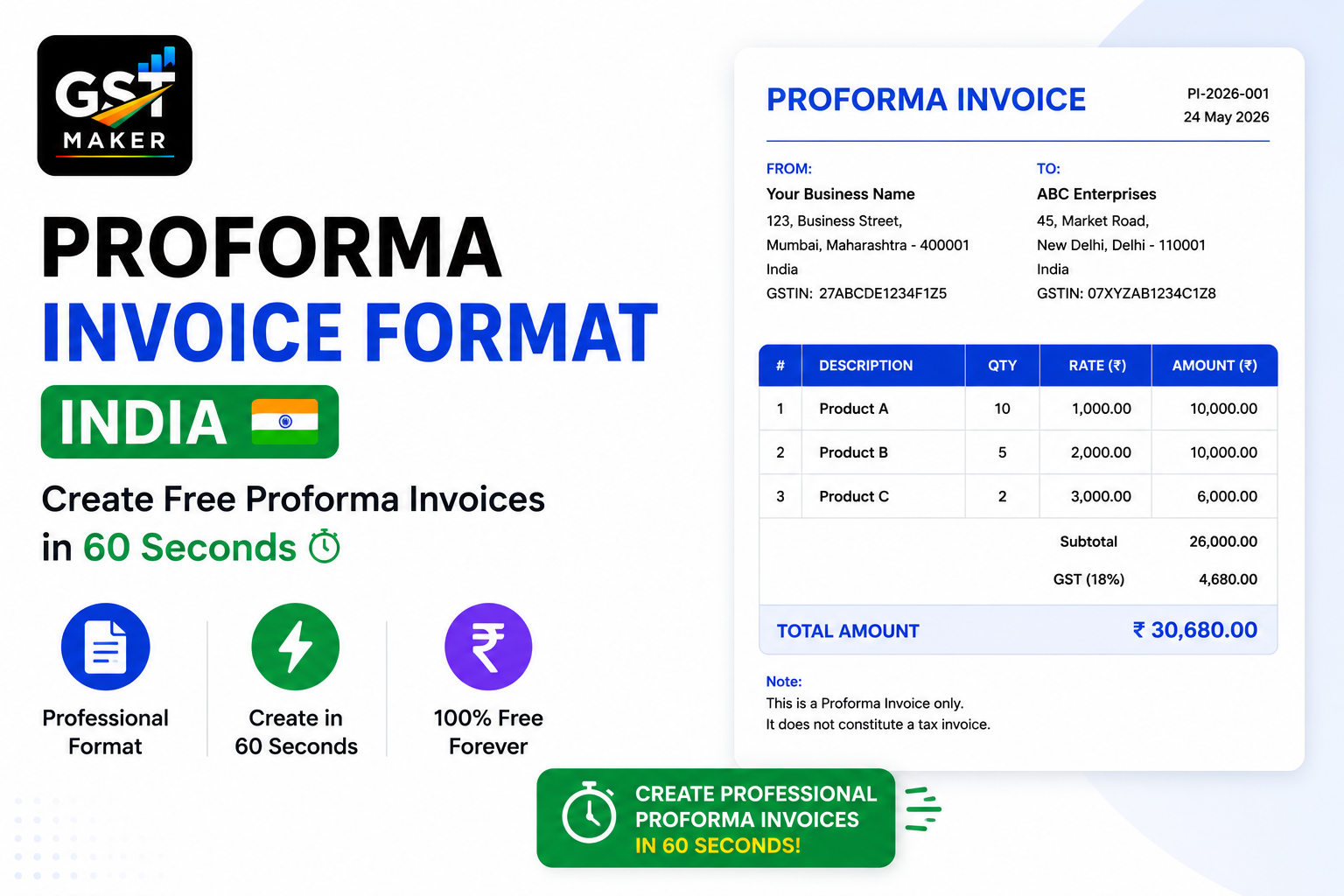
There are moments in business where a client wants to know the cost before anything's actually shipped or delivered. Maybe they need internal approval first. Maybe they want to arrange an advance payment. Maybe they just want something on paper confirming what they'll be charged before the real invoice shows up.
That document is a proforma invoice.
Most businesses either skip this entirely, cobble together a random Word template, or fire off a rough WhatsApp message with the numbers. None of that looks particularly professional, and none of it converts easily into a real invoice once the work's actually done.
GST Maker's Proforma Invoice feature handles this cleanly — a proper, GST-formatted proforma in under 60 seconds, and one click to turn it into a tax invoice once the job's complete.
What a proforma invoice actually is
It's a preliminary bill sent before the sale is actually finalized. It looks like a real invoice, with the same item descriptions, quantities, prices, and GST breakdown — but it's not a legally binding tax document.
Think of it as a confirmed quotation, or a preview of what the final invoice will look like. It tells your customer exactly what they're being charged for, what GST applies, what the total comes to, and where to send an advance payment if one's expected.
It doesn't get recorded in your GST returns and doesn't create any tax liability. It's purely a formal document that gets both sides aligned before the real transaction happens.
Proforma vs tax invoice vs quotation
This trips a lot of people up, so here's the simple version:
| Document | When you use it | Creates GST liability? | Shows up in GSTR-1? |
|---|---|---|---|
| Quotation | Before the order's confirmed — an estimate | No | No |
| Proforma Invoice | After confirmation, before delivery or payment | No | No |
| Tax Invoice | After delivery or the service is done | Yes | Yes |
Generally the flow runs quotation → proforma invoice → tax invoice. Not every deal needs all three steps, but the moment a client asks for advance payment or internal approval before they can pay you, a proforma is exactly the document to send.
When you actually need one
Before an advance payment — if a client's paying 50% upfront before you start, a proforma gives their team something real to process against.
For import/export deals — proforma invoices are standard in international trade, since the importer usually needs one to arrange a letter of credit or foreign exchange before goods even ship.
For custom orders — custom furniture, bespoke software, tailored clothing, whatever it is, a proforma confirms scope and price before you commit any real work.
For clients that need PO approval — a lot of companies require an internal purchase order before releasing payment to any vendor, and their accounts team needs your proforma to raise that PO in the first place.
For government and institutional clients — schools, hospitals, government departments almost always want a proforma before payment gets issued at all, as standard procurement process.
How it actually works on GST Maker
Open a new proforma invoice — same form as a tax invoice, same fields, just a different label.
Select your customer — saved list or new entry, GSTIN and address auto-fill either way.
Add what you're billing for — AI Magic Fill suggests HSN/SAC codes, applies CGST+SGST or IGST based on the customer's state, and calculates tax on its own.
Generate it — a proper PDF is ready in seconds, with your logo, GSTIN, the customer's details, item breakdown, GST calculation, total, and your bank details for the advance payment.
Share it — WhatsApp link or email, opens cleanly on any device.
Convert it later — once the work's done or goods are delivered, hit Convert to Tax Invoice on the same document. Everything carries over automatically, with a proper invoice number assigned — nothing retyped.
A web development agency in Hyderabad
TechFlow is a small agency with 4 developers, taking on 3-4 projects a month ranging from ₹30,000 to ₹2,00,000 each.
Their old process: rough quote by email, client asks for something formal, cobble together a Word proforma, deliver the project, then manually retype everything into a tax invoice at the end.
Now they build the proforma in 2 minutes right after a client confirms, IGST is calculated correctly since most of their clients sit outside Telangana, the client's accounts team processes the advance using the bank details already on the document, and delivery just means converting the same proforma into a tax invoice with one click.
That's roughly 30-40 minutes saved per project — close to 3 hours a month across their usual 4 projects, just in billing admin they no longer do.
A furniture manufacturer in Rajkot
Nilesh runs a custom furniture unit in Rajkot, taking orders from interior designers and contractors across the country for sofas, wardrobes, dining sets.
Every order starts with a proforma — his designer clients need one to show their own customers the price before confirming anything. His old process was a scrappy Excel file that didn't exactly scream "established supplier."
Now the proforma comes out with the right HSN codes for furniture (9401, 9403), CGST+SGST if the designer's in Gujarat or IGST if they're elsewhere, and a properly branded document delivered over WhatsApp. Once the furniture ships, it's one click to convert to a tax invoice.
His interior designer clients — a fairly professional, detail-oriented crowd — now see him as noticeably more organized, and he's picked up repeat business specifically because his billing looks the part.
A management consultant in Chennai
Kavya consults for mid-sized companies, typically charging ₹1,50,000 for a 3-month engagement.
Corporate clients almost always need a proforma before their accounts team can release anything — internal PO, approvals, then payment. She used to just email numbers in plain text, and inevitably get a reply asking for "something on letterhead," which she didn't actually have ready.
Now a GST Maker proforma takes her 2 minutes — her logo, GSTIN, the client's GSTIN, SAC code 998311 for consulting, 18% IGST broken out, and her bank details, all in one document. Her clients' accounts teams get exactly what they need on the first try, and payment shows up faster as a result.
Why the proforma is worth getting right
For a lot of clients, this is the first formal billing document they see from you — and it sets the tone for everything after.
A clean proforma signals you're organized, that your billing is transparent and GST-compliant, and that you've got proper systems behind you. A scrappy Word doc or a WhatsApp message full of numbers signals the opposite, even if the actual work is excellent.
GST Maker's proforma invoices are visually identical to its tax invoices — same template, same format, same GST math. The only difference is the label at the top.
What works alongside this feature
Quotations, for before a client's even confirmed — convert straight to a proforma once they do.
Tax invoices, which the proforma converts into with one click once the work's actually delivered.
Recurring invoices, if you've got retainer clients billed the same amount monthly — you can skip the proforma step for these entirely.
Client management, so GSTIN and address are saved once and never retyped across quotation, proforma, and tax invoice.
And AI Magic Fill, working identically here as it does on tax invoices — correct GST type, suggested codes, calculated tax, no manual decisions.
Questions people usually ask
Is a proforma the same as a GST invoice? No — it's a preliminary document with no legal tax status and no GST liability. A tax invoice is the official post-delivery document that actually gets recorded in GSTR-1.
Is this feature free? Yes, part of the free plan, no upgrade needed.
Can I convert a proforma into a tax invoice? Yes, one click once the work's delivered — everything carries over, nothing retyped.
Does a proforma need GST amounts on it? It's good practice to include them so your customer already knows what the final tax invoice will look like, and GST Maker calculates this automatically on every proforma.
Is a proforma legally required under GST? No — it's a business practice, not a GST law requirement. Only the tax invoice is mandatory.
Can I add bank details for advance payment? Yes, your account details show up on the proforma automatically so the client can pay directly against it.
What's the actual difference between a quotation and a proforma? A quotation comes before the order's confirmed and is just an estimate. A proforma comes after confirmation and previews the real bill. You can move a deal through both, then into a tax invoice, as it progresses.
Send professional proforma invoices, for free
Stop sending rough WhatsApp numbers or a messy Word doc the next time a client wants advance billing details. Build a proper, GST-formatted proforma in under 60 seconds, and convert it to a tax invoice with one click when the job's actually done.
👉 Try GST Maker free at gstmaker.com
No credit card. No setup fees. Create your first proforma invoice today.