AI Article Assistant
Ask questions, summarize, or extract key takeaways from this article.
AI Invoice Generator India — Meet GST Maker's AI Magic Fill Feature
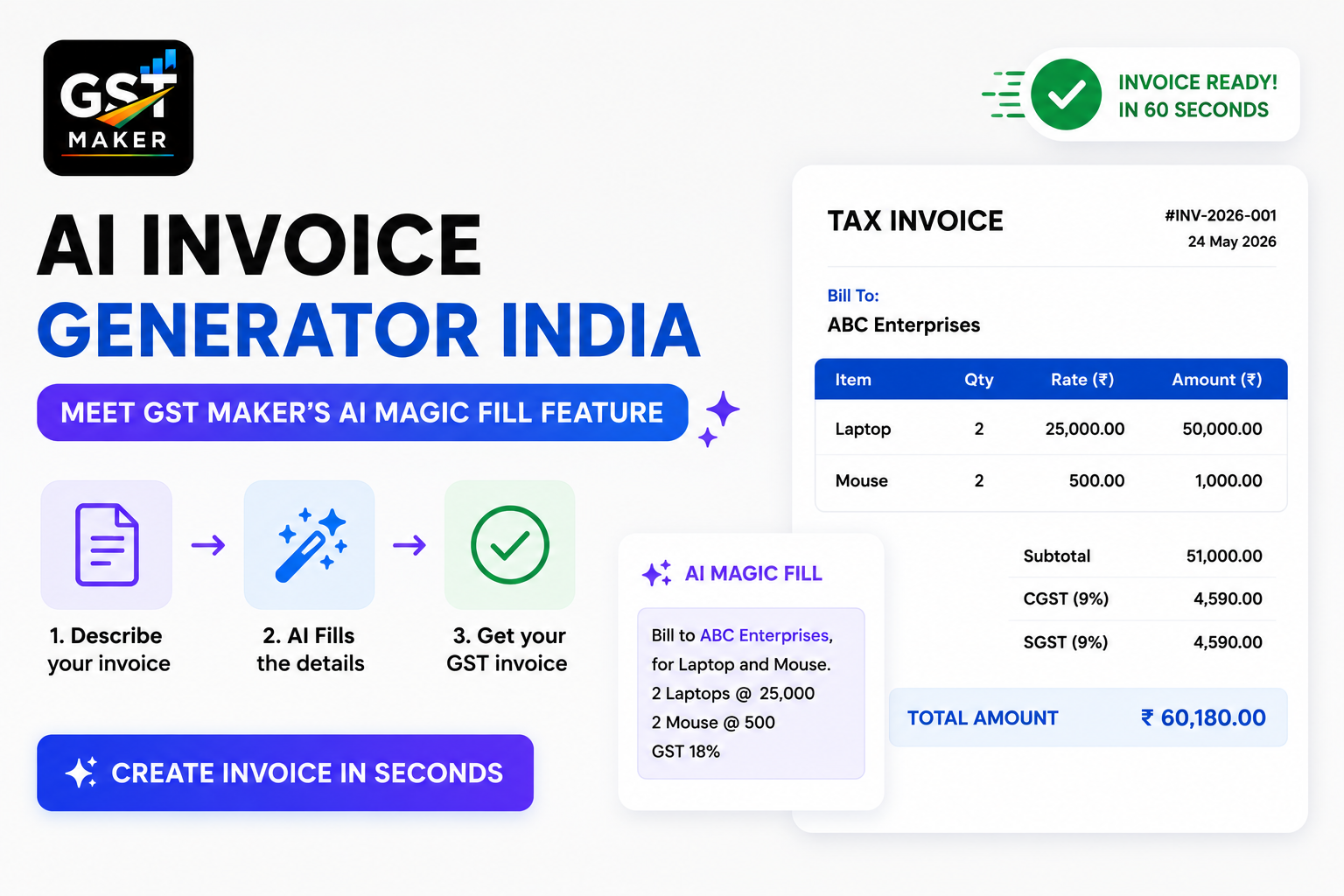
Creating a GST invoice sounds simple on paper. But if you've actually done it by hand, you know the real story — figuring out CGST vs IGST, hunting down the right HSN or SAC code, calculating the tax, keeping the invoice number in sequence, formatting the PDF so it doesn't look like a mess. None of it is hard individually, but it adds up to a lot of small decisions every single time you bill someone.
What if none of those were your decisions to make?
That's what AI Magic Fill on GST Maker actually does. It fills in the complicated parts of a GST invoice automatically, so your job is just to bill your client — not become a part-time tax clerk in the process.
What it actually does
When you start a new invoice, it doesn't sit there waiting for you to fill in every field. It reads your customer's state and applies CGST+SGST or IGST on its own, suggests the right HSN or SAC code based on what you're selling, works out the exact tax amount, assigns the next invoice number in your sequence, and pulls in whatever's already saved about that customer or product.
End result — a fully compliant invoice in under 60 seconds, even if you've never read a single line of GST law.
Why this matters more than it sounds like
Most small business owners aren't accountants. They're plumbers, designers, shop owners, consultants, traders — people who know their actual work cold, but for whom GST is a completely separate subject they never signed up to master.
Two things trip people up more than anything else.
First, CGST vs SGST vs IGST. The rule itself is simple — same state gets CGST+SGST, different state gets IGST — but when you're billing 10 clients spread across different states every week, it's genuinely easy to slip up. Get the tax type wrong once, and your customer can't claim their input tax credit.
Second, HSN and SAC codes. There are thousands of HSN codes for goods and hundreds of SAC codes for services, and picking the wrong one makes the invoice non-compliant. Most people either guess, copy from an old invoice, or lose 10 minutes Googling it every single time they bill.
AI Magic Fill takes both of these off your plate completely.
How it actually flows
You pick your customer from the saved list, and it immediately reads their state off the saved profile.
Same state as you? CGST+SGST, applied instantly. Different state? IGST kicks in. Nothing to click, nothing to decide — it just happens in the background.
Then you start typing what you're selling, and it suggests matching items from your saved list along with the right HSN or SAC code based on the description.
The moment price and GST rate go in, the tax gets calculated and shown, already broken down correctly based on where the customer is.
The invoice number gets assigned automatically too — no duplicates, no gaps in sequence, both of which are exactly the kind of thing that raises flags during an audit.
Hit generate, and a branded PDF is ready in seconds — logo, GSTIN, every mandatory field, correct tax breakup.
Start to finish, under 60 seconds.
A real example — a web developer in Mumbai
Rohit freelances as a web developer out of Mumbai, with clients scattered across Delhi, Bangalore, and Mumbai itself.
Before GST Maker, his process looked like this: open the Excel template, check whether the client's in Maharashtra or elsewhere, decide CGST+SGST vs IGST manually, Google the SAC code for web development, work out 18% tax by hand, format the PDF, save with the right invoice number, send on WhatsApp. Roughly 15-20 minutes per invoice, and with 12 invoices a month, that's 3-4 hours a month just on billing.
With AI Magic Fill, it's select the client (state detected automatically), type "Web Development Services" (SAC 998314 suggested), enter the amount (tax calculated instantly), hit generate (PDF ready in 5 seconds), copy the share link, send.
Under 60 seconds per invoice. His 12 monthly invoices now take about 12 minutes total instead of 4 hours.
Another example — a wholesale trader in Jaipur
Sunita runs a fabric wholesale business in Jaipur, selling to retailers across Rajasthan, Delhi, Gujarat, and UP — different states, different GST types, and different HSN codes depending on the fabric.
Doing this manually was genuinely a nightmare. Silk carries a different HSN code than cotton. Same-state clients need CGST+SGST, other states need IGST. Get any of it wrong, and her retailer clients can't claim ITC — and they let her know about it.
With AI Magic Fill, she just picks the client, adds the fabric type, and everything else — code, tax type, tax amount — happens on its own. Her invoices come out correct every time, and her clients stopped having ITC problems altogether.
What actually sets this apart from regular billing software
Most billing tools just give you dropdowns and form fields — you still need to know what to pick, the software just speeds up the typing.
AI Magic Fill genuinely reads the situation — who the customer is, where they're based, what you're selling — and fills in the answer rather than just the field. That's the real difference between a form and something that's actually thinking alongside you.
All of this — still free
AI Magic Fill sits inside GST Maker's free plan, no upgrade needed. Along with it, the free plan covers tax invoices, proforma invoices, quotations, recurring invoices for monthly clients, an expense tracker, GSTR-1 ready reporting, inventory tracking, client management, and the public share link for WhatsApp sharing.
All of it, in one place, free.
Who gets the most out of this
Freelancers billing clients across multiple states, where the GST type changes invoice to invoice. Shop owners selling to B2B buyers, where HSN codes and tax math get genuinely complex. Agencies juggling different services with different SAC codes. New GST registrants who just got a GSTIN and have no idea where to start. And honestly, anyone who just finds manual billing tedious enough to want it handled for them.
Questions people usually ask
What exactly is AI Magic Fill? GST Maker's built-in invoice assistant — it detects the right GST type based on your customer's state, suggests HSN/SAC codes, calculates tax, and assigns invoice numbers automatically.
Is it free? Yes, part of the free plan, no upgrade required.
How does it decide CGST/SGST vs IGST? It compares your customer's saved state against your business state — same state gets CGST+SGST, different state gets IGST, applied the moment you select the customer.
Can it suggest HSN/SAC codes? Yes — as you type your product or service name, it suggests the matching code. You can accept it or search for a different one.
What if the suggested code is wrong? You can override it any time. It's there to assist, not lock you in — you always have the final say before generating.
Does it work for both goods and services? Yes, including mixed invoices with both on the same bill — HSN for goods, SAC for services.
How long does an invoice actually take? Under 60 seconds once your customer and product details are already saved. A brand-new customer takes an extra 2-3 minutes to set up the first time.
Worth the switch
Every minute spent manually calculating GST or hunting for HSN codes is a minute away from your actual work. AI Magic Fill hands those minutes back, for free.
👉 Try AI Magic Fill at gstmaker.com
No credit card. No setup fees. Your first AI-assisted GST invoice is ready in under 60 seconds.